
A common question emerges as conversational models become more advanced: can you make ChatGPT watch a video? Users envision a scenario where they simply provide a YouTube link and receive a detailed summary, analysis, or answers to specific questions about the visual and auditory content. The direct answer is that ChatGPT, in its native form, cannot process video or audio data. It is a text-based model. However, the broader inquiry behind this question reveals a significant frontier in technology development. This article will dissect the precise technical limitations, explain the effective current solutions that simulate “watching” a video, and analyze the trajectory toward genuine multimodal understanding.
Understanding this capability gap and its solutions is crucial for professionals, researchers, and content creators who aim to leverage automation for video analysis, accessibility, and content repurposing. We will move from the model’s fundamental architecture to practical, step-by-step methodologies that deliver results today, concluding with a realistic view of the evolving landscape.
Table of Contents
The Core Limitation: Text as the Native Language
ChatGPT is fundamentally designed to understand and generate textual information. Its training involves processing immense datasets comprised of written language, code, and mathematical notation. This enables it to grasp syntax, context, and nuance within text. Video files, however, are containers for complex, sequential data streams—visual frames and audio waveforms. These modalities are alien to a text-only model.
The model lacks the inherent sensory or perceptual modules to decode pixels into objects, scenes, or actions, or to convert audio signals into spoken words, music, or sound effects. Asking ChatGPT to watch a video directly is analogous to asking a radio to display a photograph; the fundamental hardware and processing pathways are mismatched. Therefore, the primary challenge is converting the non-textual information within a video into a format the model can comprehend: text.
Current Methodologies: Simulating Video Analysis
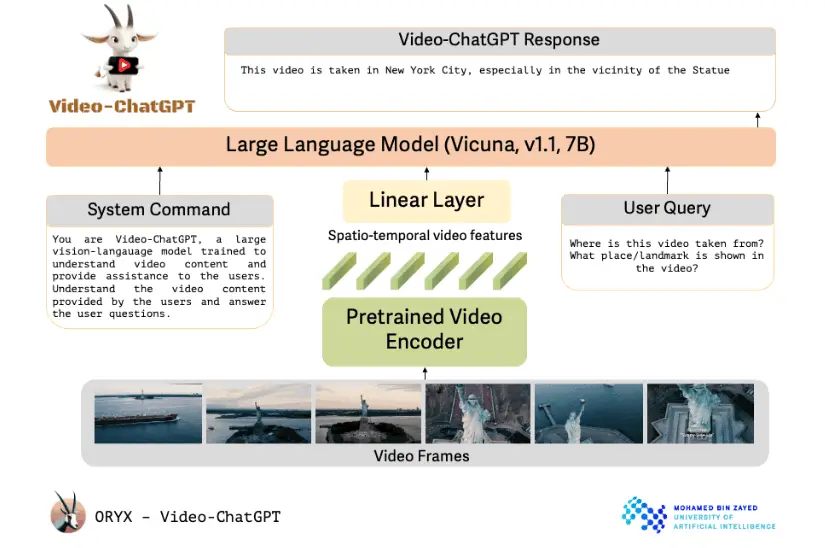
While direct processing is impossible, robust methodologies exist to achieve the functional outcome users seek. These methods involve a preprocessing pipeline where other specialized tools handle the audio-visual decoding before presenting textual data to ChatGPT. The quality of the final analysis is entirely dependent on the accuracy of this preliminary conversion.
The most common and effective workflow involves two distinct extraction steps: obtaining a transcript and generating descriptive text for visual content. Each step relies on separate technologies that have matured significantly. By chaining these tools, you create a comprehensive textual representation of the video’s content, which ChatGPT can then analyze with its full capabilities.
Extracting the Audio Narrative: The Power of Transcription
The first and often most critical component is the spoken content. Accurate transcription converts dialogue, narration, and sometimes even relevant non-speech audio cues into a written script. Several services excel in this domain, offering varying levels of accuracy and cost.
Professional-grade automated services like Otter.ai, Rev, and Sonix provide high-accuracy transcription with features like speaker identification. For users integrated within certain ecosystems, Microsoft Azure or Google Cloud’s speech-to-text APIs offer powerful, programmable solutions. Many video conferencing and social media platforms also now include native transcription features. The output is a clean, time-stamped text file that forms the backbone of your analysis, capturing the explicit verbal information presented in the video.
Describing the Visual Stream: Overcoming the Biggest Hurdle
Transcribing audio is a solved problem relative to describing visual scenes. This is the more complex challenge in making a model “watch” a video. The process involves visual description generation, which requires a different class of model specifically trained on image and video understanding. These computer vision models can analyze individual frames or frame sequences and output descriptive captions.
Currently, a fully automated, high-fidelity description of an entire video’s visual narrative is not a trivial task. However, practical approaches exist. For structured content like presentations or tutorials, you can use Optical Character Recognition (OCR) to extract text from slides or screens. For other video types, one can use services or models that generate captions for key scenes. The most reliable method, for now, often involves a hybrid approach: using an automated tool for initial frame sampling and description, supplemented by human review for critical sections to ensure contextual accuracy.
Integrating Components for Comprehensive Analysis
Once you possess both the transcript and a visual description document, you can synthesize them into a cohesive prompt for ChatGPT. This is where strategic prompting becomes essential. You must instruct the model on how to interpret the provided data. A structured prompt might include: “Below is a transcript and a visual description of a video. The transcript is labeled [TRANSCRIPT] and the visual description is labeled [VISUALS]. Based on this combined information, perform the following analysis: [Your specific questions].”
This method allows ChatGPT to cross-reference the audio and visual text streams. For instance, if the transcript mentions a “significant drop,” and the visual description notes “a graph showing a steep decline in revenue,” the model can connect these concepts to provide a unified analysis. The depth of insight is directly proportional to the quality and detail of the textual inputs you provide.
Practical Applications and Use Cases
The ability to simulate video analysis unlocks numerous valuable applications across sectors. Content creators and marketers can generate detailed show notes, chapter summaries, and keyword-rich blog posts derived from their video content, significantly enhancing SEO and accessibility. Educators and trainers can automatically create study guides, quizzes, and condensed lesson summaries from lecture recordings or instructional videos.
In corporate and research settings, teams can analyze recorded meetings, extracting action items, decisions, and sentiment trends. Analysts can process presentations or conference talks to quickly compare viewpoints and extract data points. Furthermore, this process dramatically improves accessibility by creating thorough textual records for individuals who are deaf or hard of hearing, going beyond basic captions to include visual context.
Challenges and Considerations in Simulated Analysis
Despite the power of this workflow, important limitations persist. The entire process is only as strong as its weakest link. Inaccurate transcription, especially with technical jargon, strong accents, or poor audio quality, will lead to flawed analysis. More critically, automated visual description is still an emerging field. Models may miss subtle details, misinterpret context, or fail to capture the narrative flow between scenes.
There is also a loss of tonal and emotional nuance from the original speaker’s voice, which a transcript alone cannot fully convey. Sarcasm, urgency, or uncertainty might be lost. The user must also consider the operational overhead: the process requires multiple tools and steps, which can be time-consuming for long videos. Finally, costs can accumulate when using premium transcription and specialized computer vision services.
The Future of Direct Video Processing
The question “can you make ChatGPT watch a video?” is driving rapid innovation. The next generation of models are inherently multimodal, meaning they are trained from the ground up on combined datasets of text, images, audio, and video. These systems learn the associations between modalities during training, allowing them to accept video input directly and interpret the interconnected layers of information natively.
Future iterations will likely feature integrated capabilities where a single model can accept a video URL, automatically process the audio and visual tracks internally, and answer questions or provide summaries. This will eliminate the need for external preprocessing pipelines. However, these models will still face fundamental challenges in contextual understanding, bias from training data, and the interpretation of abstract or culturally specific visual metaphors. The evolution will shift from technical workflow hurdles to refining the depth and reliability of analysis.
Conclusion: Can You Make ChatGPT Watch a Video?
To conclude, you cannot make the current text-based ChatGPT watch a video in a literal sense. Its architecture prohibits direct perception of audiovisual data. However, you can construct a highly effective analytical pipeline that achieves the same practical outcome. By leveraging sophisticated transcription services and visual description tools to convert video content into rich text, you can then utilize ChatGPT’s powerful reasoning and language capabilities to analyze, summarize, and draw insights from that textual representation.
The process requires an understanding of the model’s limitations and a methodical approach to data preparation. As technology progresses, the line between simulated and direct analysis will blur with the advent of native multimodal systems. For now, the combined approach offers a powerful and practical solution for anyone needing to extract meaningful information from video content, transforming passive viewing into an interactive, queryable data analysis task.