
You have a great YouTube video. You want to summarize it or ask questions about its content. So you wonder: can ChatGPT watch YouTube videos? The short answer is no. ChatGPT cannot directly watch or listen to videos.
This article gives you the clear answer. You will learn why it is not possible. More importantly, you will get practical workarounds. These methods let you use ChatGPT with video content effectively.
Understanding this limit is key. It helps you use AI tools in the right way. You can save time and avoid frustration.
Table of Contents
Why ChatGPT Cannot Watch Videos Directly
ChatGPT is a large language model. It processes and generates text. It does not have eyes, ears, or a visual interface.
Think of it as a very advanced text reader and writer. It learns from written words. It cannot process raw audio or visual data.
The AI has no ability to access the internet live in its standard version. It cannot open a web browser. It cannot navigate to YouTube. It cannot stream a video file.
Its knowledge is based on its training data. This data included a vast amount of text. It did not include direct video or audio feeds.
Practical Workarounds to Use ChatGPT with YouTube Content
You still need to analyze a video. You can bridge the gap manually. The strategy is simple: convert the video information into text.
Then, you give that text to ChatGPT. Here are the most effective methods.
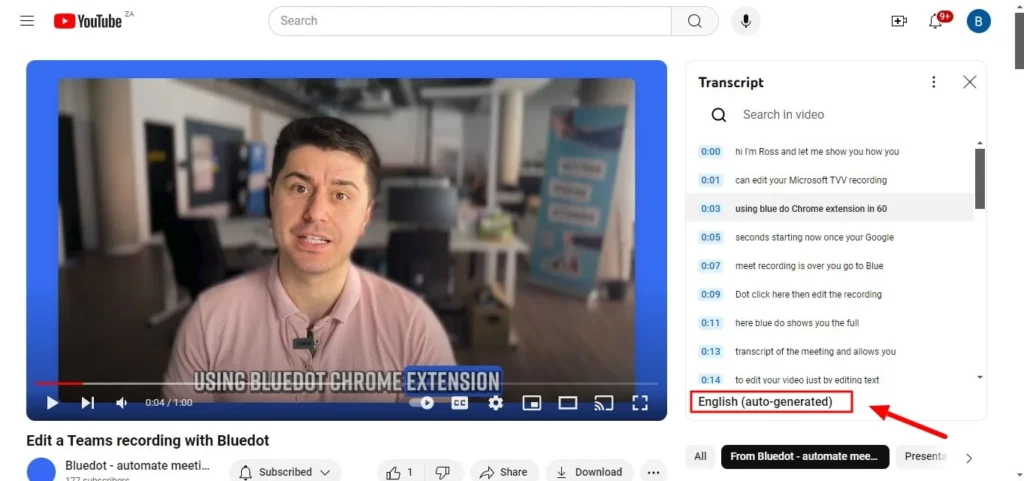
First, use the video’s transcript. Many YouTube creators provide closed captions. You can access these directly on the video platform.
Click the “…” menu below the video. Look for “Open transcript.” Copy this text. Paste it into ChatGPT with your request.
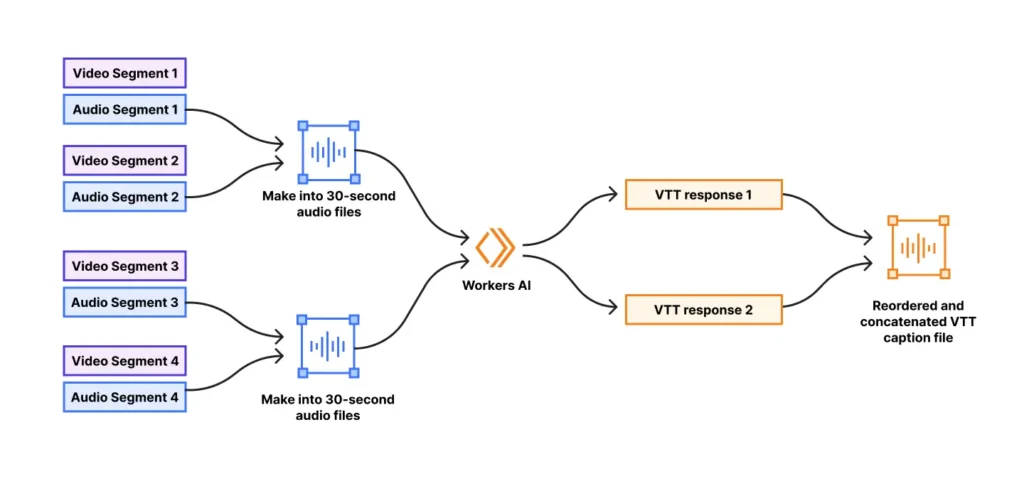
Second, use third-party tools for transcripts. Services exist that generate text from video audio. They are often very accurate.
You provide the YouTube link. The tool gives you a text file. You then use that text with the AI.
Third, provide detailed notes yourself. Watch the video and take notes. Summarize key points, quotes, and data.
Your notes become the input for ChatGPT. Ask it to format or expand on your notes.
Step-by-Step: How to Analyze a YouTube Video with ChatGPT
Follow this clear process. It works for lectures, tutorials, and presentations.
Step one: obtain the transcript. Use the built-in YouTube transcript feature. Copy all the text into a document.
Step two: prepare your prompt. Start by giving ChatGPT context. Tell it the video topic and your goal.
For example: “Here is the transcript from a YouTube video about Python programming. Please summarize the five key lessons.”
Step three: paste the transcript. You may need to split very long transcripts. Stay within the AI’s text limit for one conversation.
Step four: ask specific questions. Once the AI has the text, you can query it.
Ask for summaries, definitions, or follow-up questions. The AI can work with the text you provided.

What ChatGPT Can Do With a Video Transcript
You have the transcript. Now, see the power of combining it with AI. ChatGPT becomes a powerful analysis tool.
It can create concise summaries. Get a one-paragraph overview or bullet-point notes. This is perfect for research or learning.
It can extract key points and quotes. Identify the most important statements from the speaker. Organize them by theme or chapter.
It can generate study guides or Q&A sheets. Turn a lecture into a revision tool. This helps students and professionals.
It can translate the content into other languages. Work with the text version to create a translated summary.
It can analyze the argument or structure. Ask if the video presents evidence well. Understand the flow of logic.
The Limits of This Approach
The workaround is powerful. But you must know its limits. Accuracy depends on the transcript quality.
Automated transcripts can have errors. They may mishear technical terms or names. This can confuse the AI.
ChatGPT cannot analyze visual elements. It misses charts, graphs, demos, or on-screen text. Your notes must describe these.
It cannot interpret tone or emotion from voice. The text loses sarcasm, excitement, or urgency. The analysis is purely textual.
The AI’s knowledge is not updated by the video. It only knows what is in the transcript you provide. It cannot add later facts.
Future Possibilities: When AI Might “Watch” Videos
Technology evolves quickly. New AI models are multimodal. This means they can process more than text.
Some advanced AIs already handle images and audio. The future may bring integration. Imagine pasting a YouTube link directly.
The AI would use speech-to-text technology internally. It might describe key visual scenes. This functionality is in development.
For now, the manual method is your best tool. It gives you control and reliable results. You understand the process from start to finish.
FAQ: Can ChatGPT Watch YouTube Videos?
Can ChatGPT access YouTube links?
No, the standard version of ChatGPT cannot click links or access the internet. It cannot open a YouTube URL to watch content. Some premium versions with web browsing can fetch text from a page, but not watch the video itself.
What is the best way to summarize a YouTube video with ChatGPT?
The best way is to use the video’s transcript. Copy the transcript text from YouTube. Paste it into ChatGPT. Then ask for a summary in your preferred format and length.
Can ChatGPT describe what happens in a video?
Not directly. Without a text description or transcript, it has no information. You must provide a written account of the visual events for ChatGPT to work with that information.
Are there AI tools that can watch videos?
Yes, other specialized AI tools are emerging. They use computer vision and audio analysis. They can describe visual content and analyze audio. These are different from core language models like ChatGPT.
Conclusion
So, can ChatGPT watch YouTube videos? The direct capability does not exist. ChatGPT is a text-based tool.
But you have effective paths forward. Convert video content to text via transcripts. Use that text to unlock powerful AI analysis.
This method lets you summarize, question, and organize video knowledge. You save hours of manual work. Understand the limits of missing visuals and tone.
Use this practical approach today. Find a tutorial or lecture you need to review. Grab its transcript and start a conversation with ChatGPT. See how it turns video content into actionable text for you.