
You have a video. It could be a tutorial, a lecture, or a meeting recording. You want ChatGPT to summarize it or answer your questions about the content. So, you ask: can ChatGPT watch videos? The direct answer is no. ChatGPT cannot see, hear, or process video or audio files directly. It is a text-based AI. But that does not mean you are stuck. You can use smart methods to give ChatGPT the information it needs from a video. This guide explains how.
Think of ChatGPT as an expert reader, not a viewer. It analyzes and generates text. To work with video content, you must first convert the video’s information into text. This process is straightforward. We will show you the practical steps. You will learn how to get transcripts and describe visuals. By the end, you will know exactly how to use ChatGPT with any video.
Table of Contents
Why ChatGPT Cannot Process Videos Directly
Understanding ChatGPT’s limits helps you use it better. ChatGPT is built on a language model. It was trained on massive amounts of text data. It predicts and generates words based on patterns in that data. It does not have vision or hearing capabilities. When you upload a file, ChatGPT may read the text within it if it is a supported format like PDF or TXT. But it cannot extract meaning from pixels or sound waves.
The AI processes your text prompts and responds with text. It cannot watch a YouTube clip or analyze a MP4 file. Any interaction with video must start with you providing a text description or transcript. This is a core limitation of its current design. Knowing this sets the stage for effective workarounds.
How to Make ChatGPT Understand Video Content
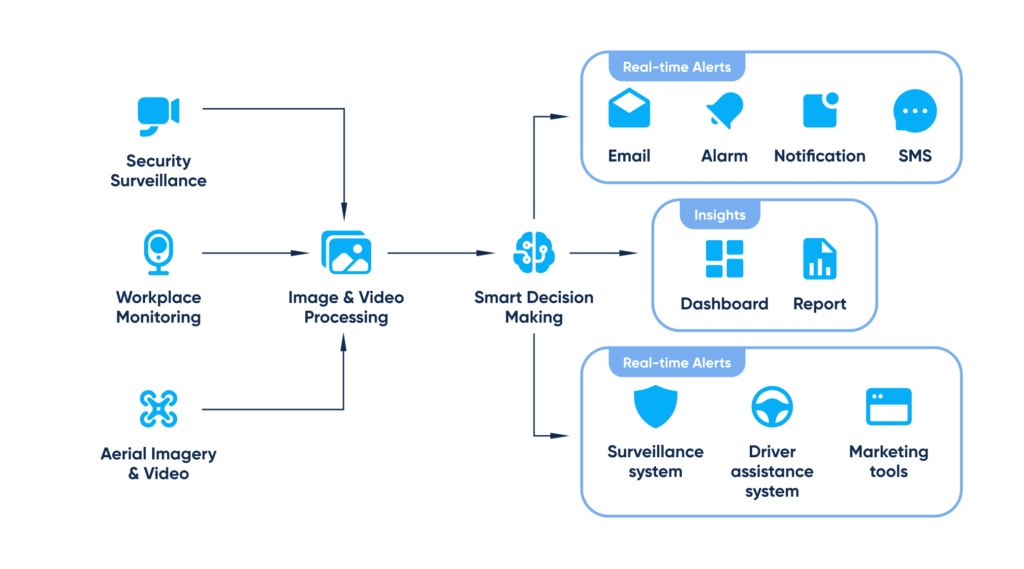
Since ChatGPT cannot watch videos, you bring the video to it as text. This involves two main tasks. First, you get the spoken words out of the video. Second, you describe any crucial visual information. The combination of these two elements gives ChatGPT a complete picture.
The most important element is usually the audio transcript. This contains the core information. For many videos, the transcript is enough. For example, a podcast or a lecture relies heavily on spoken words. For a tutorial with on-screen steps, you may need to add visual notes. The process is simple and relies on tools you likely already use.
Practical Steps to Get a Video Transcript
You need a text version of the video’s audio. Here is how to get it.
- Use Built-in Platform Features. Many platforms like YouTube offer auto-generated transcripts. Click the “…” menu below a video and look for “Open transcript.” Copy and paste this text.
- Employ Transcription Software. For videos without transcripts, use a dedicated tool. Services like Otter.ai, Rev, or Descript can transcribe audio. You upload your video file, and they return a text file.
- Leverage AI Tools. Some AI platforms now combine vision and language. For instance, you can describe a video scene to a multi-modal AI. But for ChatGPT, stick with the pure text transcript method.
Once you have the transcript, you have the key. You can now paste it into ChatGPT with a clear prompt. For example: “Here is the transcript of a cooking video. Summarize the recipe steps in a list.” ChatGPT will analyze the text and provide your answer.
How to Describe Visuals for ChatGPT
Sometimes what you see matters. A chart in a presentation or a DIY step in a tutorial is visual. Since ChatGPT cannot watch videos to see these, you must describe them.
- Be Specific and Concise. Note what is on screen. Say: “The presenter shows a pie chart where 40% is labeled ‘Market Segment A.'”
- Time-Stamp Key Moments. If referencing a long transcript, note when visuals appear. “At 05:30, the instructor demonstrates the knot-tying technique.”
- Combine with Transcript. Provide the visual description alongside the relevant part of the transcript.
Your prompt could look like this: “Transcript: [Paste transcript]. At 10:15, the video shows a diagram of a brain with the hippocampus highlighted. Based on the transcript and this visual, what is the hippocampus’s main function discussed?” This gives ChatGPT the context it needs.
Can ChatGPT Watch Videos Through Other AI Tools?
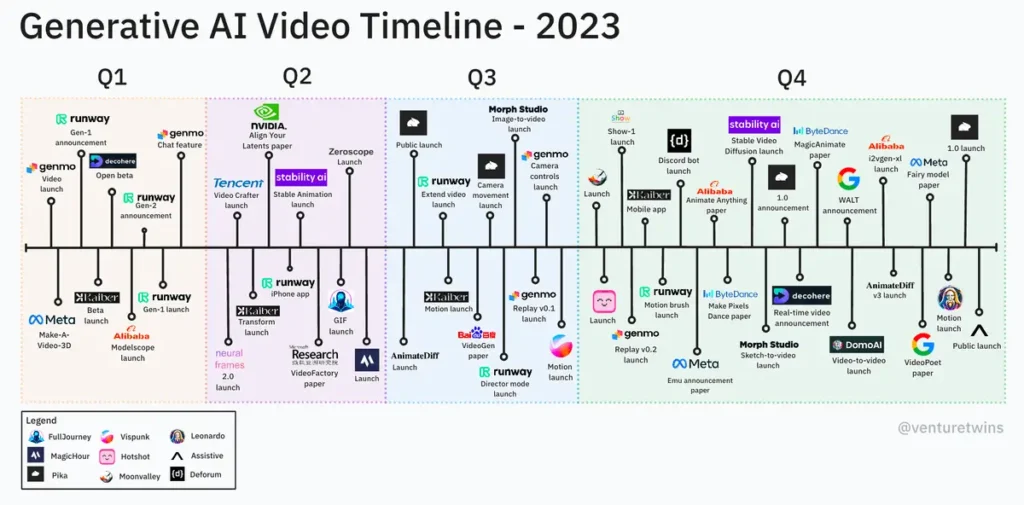
The landscape of AI is changing rapidly. While ChatGPT itself cannot process video, other AI models are multi-modal. This means they can understand more than one type of input, like images, audio, and text.
For example, some newer AI systems can accept video uploads. They might create a summary by analyzing the audio track and key frames. However, these are not ChatGPT. They are different tools with different capabilities. It is important to check the features of the specific AI you are using.
For now, the most reliable method with ChatGPT is the manual one. You act as the bridge. You use other tools to get the transcript and then use ChatGPT for analysis, summarization, or Q&A. This two-step process is powerful and gives you full control.
Best Use Cases for ChatGPT and Video Content
This method unlocks many practical applications. You save time and gain deeper insights from video material.
- Summarize Long Content. Paste a transcript of a two-hour lecture and ask for a 300-word summary.
- Extract Action Items. Feed the transcript of a team meeting video. Prompt: “List all action items and who is responsible.”
- Create Study Guides. From an educational video, ask ChatGPT to generate quiz questions and key takeaways.
- Repurpose Content. Turn a video transcript into a blog post outline, a list of social media posts, or a newsletter.
- Translate and Localize. Get a transcript, then ask ChatGPT to translate the key points into another language.
These uses are practical and immediate. They solve real problems for students, professionals, and creators.
FAQ: Can ChatGPT Watch Videos?
Can ChatGPT analyze a video I link to?
No. ChatGPT cannot access the internet to follow links. It also cannot process the video file at that link. You must download the transcript separately and provide the text.
Can ChatGPT understand videos with subtitles?
ChatGPT understands the text of subtitles if you provide that text. It does not “see” the subtitles on the video. You need to copy the subtitle file (SRT) text or the burned-in subtitles’ content manually.
Is it safe to paste video transcripts into ChatGPT?
Be cautious. Do not paste confidential or private information. Assume any data you enter into a public AI tool could be used for training. Always follow your company’s data policy and use public or anonymized information.
Will ChatGPT ever be able to watch videos directly?
Future versions of AI may integrate multi-modal capabilities. However, the core ChatGPT model discussed here remains text-based. Always check the official documentation for the latest features of the AI tool you are using.
Conclusion: Use Text to Bridge the Gap
So, can ChatGPT watch videos? No. It is a text-based tool. But you have a clear path to make it work with video content. The answer is conversion. Convert the audio to a transcript. Convert important visuals to descriptive text. Then, let ChatGPT work its magic with that text.
Your role is to be the provider of accurate information. Use transcription tools and your own observations. Then, instruct ChatGPT precisely on what you need from that text. This workflow turns a limitation into a powerful advantage. You can now analyze hours of video content in minutes. Start with your next video. Get the transcript, ask a question, and see the results for yourself.